TheGreyMac Blogger Template

Posted On // Leave a Comment
DEMO              Download


Template name : TheGreyMac

Template type : 2 Sidebar, 3 Column, 3 Column footer, Adapted from Wordpress, Black, Blue, Elegant, Featured Section, Fixed width, Header Banner, Left Sidebar, Magazine, Premium, Right Sidebar, Rounded corners, Slider, Top Navigation Bar, Tabbed widget, Web 2.0

Release date : December 18, 2010

Coder/Designer Name(s) : Lasantha Bandara / CamelGraph

Coder/Designer URL(s) : http://www.premiumbloggertemplates.com/
http://camelgraph.com/
[Read more]

Physical Love Letter In Physics Language-Must Read

Posted On // Leave a Comment
PHYSICAL LOVE LETTER

Rotation Block,
Newton's Law,
Non-Inertial Frame


Dear -ve charge,
It was a fine morning that I saw you in Physics Lab and a Torque began acting on me, which made me to rotate about your axis. A force of gravity began attracting me towards you. Everytime, day and night, you are oscillating in my mind. But, your strong Electrostatics brother began repelling me. Since the Units and Dimensions were not correct, I avoided talking face to face. One day, I saw him outside my house and an electric shock was produced in me. So, I went in an Inertial frame and tried to integrate your phone number.But, everytime I failed to apply the Limits. You are the light of my life. By Doppler's effect, I feel that you are very close to my heart. Today morning, a Pseudo force was acting on me which compelled me to write the letter. A wave is travelling from you to me. I request you to meet me at Adiabetic Park. Please don't differentiate me. I am in Tension.


Yours Attractively,
+ve charge
[Read more]

Chemical Love Letter -Must Read

Posted On // Leave a Comment
CHEMICAL LOVE LETTER
Hydrogen Tetraborate,
Carboxyl Road,
Propane


Dearest Alkali,
The day I saw you, there were sudden Chemical reactions within me involving phenolic and benzoic rings of love. Chemically, it was found that you were the reagent for the reaction. I wanted to convey my feeling that very day but since Aldehyde, Ketone and Ether were with you, I realized that the reaction conditions are unsuitable & you would show Chemical Inertness. So, I had to control the nuclear reactions of my mind using Cadmium rods.If according to first law of Love Dynamics, the following reaction: Heart(Miss Alkali in absolute privacy), Affection can be propagated, then meet me at Ammonium Restaurant, Butyl Road at 5 PM failing which I shall consume a mixture of H2SO4 + HNO3 + CH3COOH + C4H5ClNO3 +(C2H5)4Pb.

Yours Chemically,
Methanoic Acid

[Read more]

Mathematical Love Letter Part-2

Posted On // Leave a Comment
MATHEMATICAL LOVE LETTER

Quadratic Equation,
Circle Road,
Binomial Junction


Dear Differentiation,
Without you, there is no existence of my functions as they are the basis of our life. Our love is always a Straight Line. There are no limits of our love and it is continuous at every point of life. Our love is so strong that no one can differentiate you and no one can integrate me. Our love is free from Complex Numbers & it is now in a state of Progression and Series. The Probability of getting apart from each other is Nil between us. Our love story is totally based on Intermediate Value Theorem which nobody in this world like FIITJEE, Brilliant, Apex, Bansal or Arihant can explain. OK Darling, Bye.

Yours mathematically,
Integration
[Read more]

Mathematical Love Letter-Must Read

Posted On // Leave a Comment

My Dear Love,

Yesterday, I was passing by your rectangular house in trigonometric lane. There I saw you with your cute circular face, conical nose and spherical eyes, standing in your Elliptical garden.
Before seeing you my heart was a null set, but when a vector of magnitude (likeness) from your eyes at a deviation of theta radians made a tangent to my heart, it got differentiated.
My love for you is a quadratic equation with real roots, which only you can solve by making good binary relation with me. The cosine of my love for you extends to infinity. I promise that I should not resolve you into partial functions but if I do so, you can integrate me by applying the limits from zero to infinity.You are as essential to me as an element of a set. The geometry of my life revolves around your acute personality.
My love, if you do not meet me at parabola restaurant on date 10 at sunset, when the sun is making an angle of 160 degrees, my heart would be like a solved polynomial of degree 10. With love from your higher order derivatives of maxima and minima, of an unknown function.

Yours ever loving, Pythagoras
De-Morgan's Law,
opposite to Guass house.
Binomial Avenue, MATHSCITY,
MATHEMATICA-
PIN : αβγδ∞θ
MOBILE: 1234567890 
[Read more]

love letter from Mr. Physics to Ms. Physics-Must Read

Posted On // Leave a Comment

A love letter from Mr. Physics to his girl friend Ms. Physics

Hi Miss Physics,

How r u? With the blessings of earth's gravitational force, I am living on the earth and hope you too. I always want the force of attraction between us to be more, for that reason we should always be closer to each other because, as Newton's Universal Law of Gravitation states the force of attraction between two masses is directly proportional to the square of distance between us ( Fa m1.m2/ d2) or
 F=G m1.m2/d2, where G is gravitational constant and its value 6.67 10  Nm2/Kg2.

My inertia of love is always greater than inertia of hate for you. So I am coming to meet you on this Saturday in my new car with a uniform velocity, where acceleration is 0(zero), in 20 minutes. Now you can calculate the distance between you and me by yourself.

In voltammeter, you'll be always in cathode and I will always in anode so that my love will be electroplated on you by the process of love plating. This time please hup the voltage of your beauty because I have already lost the resistance of 5 last times when I met you and got 100 amps. Current.

I always want to keep you in between focal point and optical center so that magnified; virtual image of yours is formed. But due to total internal reflection, you are always far from me like mirage.

I am sending you this message through ultra sound with a frequency of about 30 KHz. Please respond to it as fast as possible, like acid base reaction where you may use a sweet kiss as catalyst.

Last but not the least, please always be in the South Pole and I will be in the North Pole so that there is always attraction between us with no sign of repulsion. And our meeting point will be as usual, neutral point.

Urs truly
Mr. Physics
[Read more]

GameBoard Blogger Template

Posted On // Leave a Comment

Template name : GameBoard

Template type : 


  • 1 Sidebar, 2 Column, 
  •  Adapted from Wordpress, 
  • Featured Section, 
  • Fixed width, 
  • Header Banner, 
  • Magazine,
  • Right Sidebar, Slider, 
  • Top Navigation Bar, 
  • Web 2.0, White

Release date : December 1, 2010

Coder/Designer Name(s) : Lasantha Bandara / New WP Themes

Coder/Designer URL(s) : http://www.premiumbloggertemplates.com/
                                           http://newwpthemes.com/


I Think You All Will Like The Template...! Please Drop Your Valuable Feedback Through Comments
Have A Nice Day...! :)
And Keep Visiting :)
[Read more]

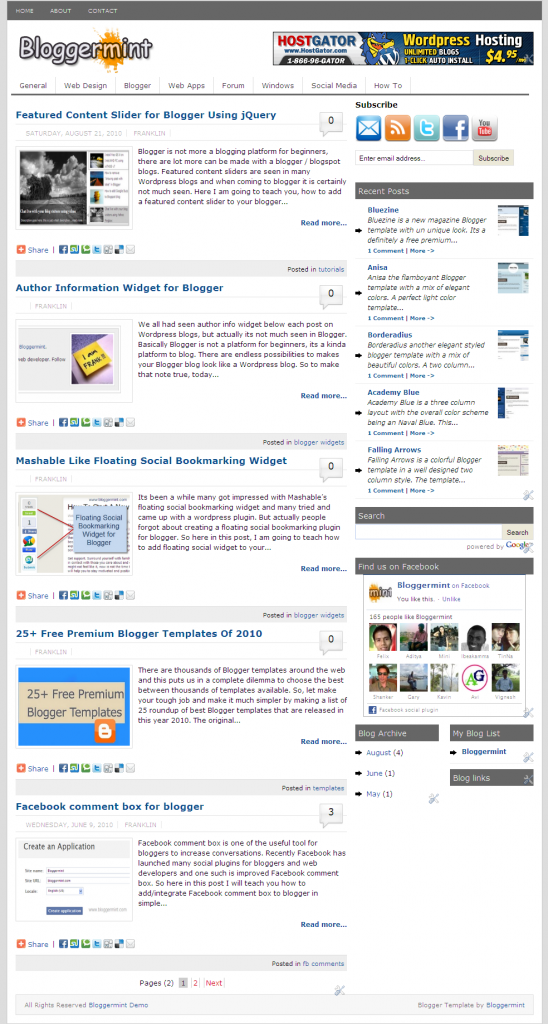
Free Download Bloggermint Blogger Template

Posted On // Leave a Comment
Hi Bloggers,Sorry for not updating the site these many days..I was a bit busy in my studies.So,I don't have enough time to update the website.Once again sorry for that,But i will update the site frequently when ever i had time :) So,Don't leave us Friends and my dear loyal readers.Today i like to share these beautiful Blogger Template which was designed by Bloggermint for bloggers.Thanks To Him for sharing these beautiful template with us.
The template has much features like as follows :
  • SEO optimized
  • Clean and neat interface
  • Premium features like bubble comments, page numbered navigation
  • Easy to customize
  • Author widget below every post
  • Sleek Facebook and Twitter share count button
  • Navigation bar with sub nav.

Live Demo | Download

It also has:
Author Info Widget:
To change the Author Info Widget...Just goto the edit html and tick the expand widgets option and now search for the code 
<div class=’author_info’>
and now change any text you like to edit like adding a bio of author...! which you like to see it on author info widget.And now to change the image,create a image with a size of 130x130 pixels and change these Url http://i50.tinypic.com/iw7lec.jpg with your image uploaded Url.


It also has Header Banner,Twitter Share Button,Subscribe Bar,Navigation bar

Please Drop Your Valuable Comments And Let Us Know What Do You Think On These Post...
If You Have Any Problem With Template,Let Us Know By Your Comments.Have A Nice Day :)
 
[Read more]

4 Best Web Apps to Manage Multiple Twitter Accounts

Posted On // Leave a Comment
We all know now a days using Multiple Twitter accounts is not so..... easier.We should always login to each twitter id to tweet or navigate through your accounts....But now the problem for these solution is sloved...!! Want to know about it.

Well,I found these web apps a better apps to use for your twitter accounts if you use Multiple accounts.Of course you can use them for a single account.So,they are as followed shown below

TwitIQ :

TwitIQ is a Smarter web app or client.It has Better Features like
- Real Time Updates
- Inline Image and Video Previews
- Multiple Accounts Support And Many More...! 
- Automatic Expansion of Shortened URLs


It is An advanced, Web-based Twitter client that supports grouping, Facebook, stats, multiple accounts,
pretty pictures, trending topics, and all sorts of other cool, awesome, and fantastic stuff :-)

It is an Web App for Easy management for multiple Twitter accounts and brand monitor...!

These is the Web App at present i am using for my twitter accounts..With these you can also attach Facebook account(Fan page) to post itself whenever you update your website or blog.


Please Drop Your Valuable Comments If You Think This Article Is Useful For You.
Share Your Feedback...!
Have A Nice Day And Blogging :)
[Read more]

Top 5 Gmail Labs Features You Must Enable Right Away

Posted On // Leave a Comment
We all know Gmail is one of the most famous email based service in the world.It is one of the simple and easy way to use and which has most powerful features within and also under the hood it has more features where you can enable more advanced functionality which we call it as "Labs".

Actually what is meant by Gmail Labs:
Gmail itself says that:


Gmail Labs allows you to try out experimental new features in Gmail. If you're going to brave the Labs world, it's important to keep the following things in mind about these features:

  • They may break at any time.
  • Similarly, they may disappear temporarily or permanently.
  • They may work so well that they graduate and become regular features.
So,Try at your own risk of course none of these features will not harm you in any kind or gobble your email but they are just not polished at Google would want them to be.


To enable the Labs in your Gmail,Just login to your Gmail account and click on the settings link and then select the Labs tab.Now select Add-ons you like from the list by 'Enable/Disable' radio button and save the changes you done by clicking the Save Changes button


I found Some of these Add-on Features to have a worth useful...check out right now:

Inbox Preview :


This Add-on shows you the latest mails you had in your inbox as a preview before you enter into inbox.It will be very important if your waiting for any important mail.Well if it loads slow for slow connections,I prefer you to use Basic Html.

Mouse Gestures : 

These Add-on helps to surf Next or Previous mails by holding right-click and move your mouse Left or Right to go for a previous or next messages.And if you move up you will be back into inbox.These is one of the best alternate way of browsing your mails,Of course you require a little practice.

Undo Send : 

These is the one of the Best Add-on because we can Undo the mail we sent.It is a most helpful Add-on for many of them since all of us make a minor mistakes while we send mails to others.It adds a Undo option feature to allow the mail revert which we sent.Of course i think these feature will be available for 5-10 Seconds after you sent the mail.But these Add-on is worth for most of them and also useful.

Custom Keyboard Shortcuts :


It lets you add custom keyboard shortcuts you define and it also add a new settings tab to re-define keys.

Inserting Images :

Allows you to add Images into your mail(message body).You can upload the images and insert from your computer or you can also insert by image Url
Note :These Add-on Feature will not work if you have offline enabled.


If i found any more new Add-ons useful...These Post Will Be updated with new Add-ons and Also Let Us Know If You find any add-ons useful.So,that we i update the post with more Add-ons here 
So,Don't Go Away...! Stay Updated With Us
And Also Please Drop Your Valuable Feedback Through Comments
Have A Nice Day :)
[Read more]

How To Show HTML/CSS Codes In Blog Posts

Posted On // Leave a Comment
Today i am going to teach you how to add Html codes in blog posts.By default web browsers read the code as a program rather than showing the code which you like to show up to your visitors or any other.So,its makes much difficult to make that way of showing the Html/Css Code and it is the most common problem for Blogger beginner's and Intermediate users.So,Now when we come back to the topic.I am going to teach you how to show up the Html/Css Code in a Box with good looking background.

Let Us Start The Topic:


  • First go to Blogger and then Sign-in
  • Go to your Dashboard--Layout(Design)--Edit Html


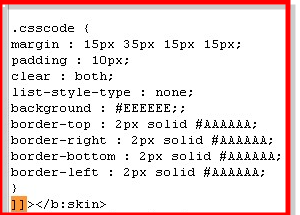
  • Now just copy the following code which is shown below and paste it before  ]]></b:skin>
--Note: Download your existing template Before you save changes in the template


.csscode {
margin : 15px 35px 15px 15px;
padding : 10px;
clear : both;
list-style-type : none;
background : #EEEEEE;;
border-top : 2px solid #AAAAAA;
border-right : 2px solid #AAAAAA;
border-bottom : 2px solid #AAAAAA;
border-left : 2px solid #AAAAAA;
}

For More Info you Can See How To Add The Code In The Below Image:

  • Now save you template to make the changes apply

From Now whenever you like to add a code in your post just add the code between 
<div class=”csscode”> and </div> like these as Shown below:


<div class="csscode">
HTML Code Here
</div>


That's it....!
Now you can show any of your code in a separate box easier to use
Please let us know if you any problem via comments
Have A Nice Day...!

    [Read more]

    Thesis Blogger Template

    Posted On // Leave a Comment
    Thesis Template is one of the best and popular WordPress theme which has many features.These template has been provided by DiyThemes for WordPress users.And i am very happy to announce that these Great Thesis Template has been now available for blogger also.By the help of Anup who Blog at "Hacktutors" the template has been successfully converted to use in blogger,Thanks to him for his great help and effort in making the temaplte available for blogger users also.Now these template is totally free(But Please Don't Remove Footer Credits).These Template Have 2 columns,Where you can have the chance to keep many widgets and ads you like and these template is mainly converted based on ShoutMeLoud.


    Features of Thesis Template:


    Well,these template has 2 stylish columns one is post body and the second one is the side bar where you can keep widgets and ads.Now at the bottom of this template you can have 3 rows also.


    This template also consists of Read More hack with automatic thumbnail to make the template more professional.So,It will not annoy your visitors with large posts and loading slow


    Readers can easily also comment on any of the post by clicking "Add your comment button" which consists on Home Page...! you can see in the above image and also, you can also see, how many comments are there in each of the blog posts.


    The template has 2 navigation bar at the top of template where you can add the main link to your blogs post or any categories.


    On the bottom of these template you have 3 rows where you can add optional widgets like About Me, Categories and so on what ever you like...!


    It has a Numbered Page Navigation at the bottom of each page...Which is so popular which makes easier to navigate. 


    Once Again Let Us All Say Thanks To Anup The Blogger At "Hacktutors" For Making The Template.
    And My Dear Loyal Readers And Friends Please Pass Your Valuable Feedback Via Comments...!
    Lets Us Know What Do You Think...!
    Have A Nice Day And Blogging.


    Note:The template has been updated please download from the below link


    [Read more]

    Html Color Codes Generator For Bloggers And Web Developers

    Posted On // Leave a Comment
    We all know about color picker which you also use in Photoshop and other photo editing tools for changing colors.Almost all the webmaster's and designer's use the Photoshop tool for editing the images and color to pick and edit.

    These tool helps you to pick your favorite color and it's code,Every color has its own unique color and code to use.So,these makes webmasters and developers to choose color picker tool who often use in Photoshop.I found the similar tool which we use in Photoshop,So you don't need to go for the color code to pick in Photoshop always.

    Instructions On How To Use The Tool :
    • In the section Hue drag the black bar vertically to generate the suitable color to pick.
    • The Swatch bar shows you the final color result that you had chosen in the tool.
    • The main three color Red Green Blue (RGB) appears on the bottom center which is based on the color that you have choose.and to pick the color code go to the Hex box which is shown below in the tool.
    • Choose the color you like until your satisfied with the color and pick the code from  Hex box.
    • Now,Drag the cursor in the tool from Brightness/Saturation section.Then choose your suitable color from the tool


    If you had a problem with the tool and don't know how to use it please don't hesitate to ask me by your valuable comments.
    Have a nice day and blogging...!
    [Read more]

    Sitonomy-Checkout Which Services They Are Using

    Posted On // Leave a Comment

    Well,Do you wanna know which services are using by Top sites and Blogs? .Now you can Track your favorite sites by using Sitonomy.These Great site has many features which helps you track other sites or competitors on Technical information like Visitors,Site usage,Advertising Networks,Feed Providers,Blogging platform and other Analytics which helps you a lot...!


    And the Sitonomy Site itself describes as "Sitonomy is a free service that allows developers and designers to find out which technologies are used in a specific blog/site. Together with the provided statistic information of popular technologies, this service makes it easier to decide what technologies are suitable to your own site"


    These are the services which the site provides much easier to navigate and it provides great info all the details you need....!
    So,What's your waiting for...!! A Must try Tool-Sitonomy for everyone.Mainly For Webmasters and Bloggers and Please say your Experience on these tool And your Valuable Feedback through Comments
    Have a nice day and Blogging.Twitter
    [Read more]

    7 Cool Twitter Tools for Multiple User & Group Tweeting

    Posted On // Leave a Comment
    Clearly, Twitter is undoubtedly the topper when it comes to Social Media Marketing tools. Out of all the tools we use today for social media marketing, Twitter tools are the most versatile and obviously most sought after. One of the good feature about Twitter is that more than one person can use it at the same time. Multiple account tweeting is a reality today with big corporations or just about anyone with a peer team manages one single Twitter account collaboratively.

    Who does group tweeting and why ?

    Collaborative tweeting or group tweeting are done mainly when there is a team managing a single twitter account. Many people use Twitter for Customer Service, and there is often a team that works in shifts to manage a Twitter account 24/7. Social Media management requires 24/7 monitoring, therefore managing between multiple users becomes a necessity.
    Here are some group tweeting/ collaborative shared Tweeting tools that should help you.

    1.  Media Funnel


    A professional group tweeting tool that lets you manage your tweets among colleagues and peer team. Analytics and event tracking for tweets are possible with this tool making it the best among the lot.


    2. Objective Marketer


    Really impressive tool that lets you schedule tweets, run campaigns and even measure them right inside the tool. Very promising tool, but costs a bit on the higher side.


    3. Hootsuite


    Probably the most popular among all Hootsuite is the most reliable tool when it comes to scheduling tweets and multiple user management. Easy to manage, Hootsuite is undoubtedly the best tool out there.


    This tool is more like a social media monitoring tool in itself, with excellent reports on social media mentions and sentiment reports. To add to it you can run campaigns with multiple users involved. Very impressive tool.


    5. Split Tweet


    This is a multi user twitter management tool and an analytics tool combined together with no other distractions. You can use it for campaigns on brands and specifically target a social media channel. however, comparing it with other tools, you’ll miss some advanced features here.


    6. Co Tweet


    An amazing social media dashboard tool created specifically for Twitter, it lets you do lot of advanced things like multiple user management, specific keyword monitoring etc. The best thing is that it has a very simple interface even with all the complexities.

    If you know more such tools, do let me know in the comments.
    Have a nice day and blogging...!


    [Read more]

    Browser compatibility tool – check your blog on various browsers and OS

    Posted On // Leave a Comment
    Wondered how to check your blog looks like on various browsers for operating systems like mozilla, safari, flock, etc and at different resolutions?
    You might ask your friends to do it for you, but when you have a free online tool that checks your blogs look on various resolutions on various browsers, why go for the tedious way?
    Browsershots is a cool handy online tool that helps your blog to be seen on many browsers like Firefox, SeaMonkey, Navigator, Galeon, Opera, IE etc. The good thing is that it throws up previews of your blog on the above mentioned set of browsers on various resolutions and on various operating systems like Ubuntu, WIndows XP, Windows 2000, PLD etc.
    It’s a fantastic tool, that’s free and completely genuine. Check it out here.
    Please pass your valuable feedback through comments...! 
    [Read more]

    4 Free Heatmap tools for tracking user behaviour on a site

    Posted On // Leave a Comment
    Tracking user behaviour on a site can be quite tricky, I agree. You get lot of questions instead of answers starting from what metrics to track and what tools to employ to how long to track a metric. Having said that, I should admit that heatmaps are fun to look at and a more easy way to make meaning of your analytics metrics. Here are ten such heatmap tools that will make analytics easy for you.

    1. Codynamix Open Source Free Heatmap Tool


    Cannoli is an open source click heatmap tool and it’s written in Ruby on Rails. It’s based on Ruwa web analytics. You can get the latest code from github: http://github.com/rosario/cannoli
    Its free however you have to request for an activation and email them with the site info you’re going to use it on.

    2.  Attention Wizard Heatmap tracking tool


    AttentionWizard uses advanced artificial intelligence algorithms to simulate human visual processing and attention. It instantly creates an "attention heatmap" of your Web page thatpredicts where someone would look during the first few seconds of their visit. This tool is more of a visual tracking tool than actual click tracking, so if you had a mock up design, just send it to this tool and it will predict you how a pair of human eyes will move along the design elements.


    3. Click Density – A Free Heatmap + Analytics Suite


    Click Density is more than a heatmap tool, its more of analytics and advanced tracking. They have both paid and free versions as well.


    4. Click Heats – Free Heatmap  Software for websites


    ClickHeat is a visual heatmap of clicks on a HTML page, showing hot and cold click zones. ClickHeat is an OpenSource software, released under GPL licence, and free of charge.


    Bonus Tools – Paid Heatmap, Visitor Tracking & Analytics Software

    1. Click Tale – See how much attention a specific website area gets from your visitors. Find what content your visitors care about the most, what they read, and what they completely skip over.

    2. Crazy Egg – Another paid heatmap software that comes at low prices.

    Please pass your valuable feedback by comments on these article
    Have a nice day and blogging...!
    [Read more]

    Get Free Traffic And Be Updated By Using Ping Services

    Posted On // Leave a Comment

    Pinging your website, blog or feed is a great Free way to get traffic.

    Here is a list of sites that offer ping service for you to use. Simply submit your your site or feed to these ping services when you update or add new content.

    You will also find other tips for getting traffic to your Articles and website or blog.


    Please use Ctrl+Click if you need To Open the site links in a New Tab Which helps you stay in these site and see more links

    Ping services allow you to automatically notify blog directories and search engines that your blog has been updated. The bigger your ping list the higher the chances of receiving traffic from those sources,

    And for blogger go to Feedburner.com and then go to Publicize and Click the option PingShot located at left side below and make it active and of course try the below sites also for pinging...! so,If you find my article helpful, please Leave a comment.

    Free Ping Services 

    My List Of Ping Services In No Particular Order

    Blog Ping for Squidoo Lenses
    A ping tool especially optimised for Squidoo Lenses, and and is for notifying the blogosphere when a lens is updated.
    My Page Rank
    Submit Free lets you submit your URL to 20 popular search engines from one MyPagerank.Net Google PageRank Checker - Check Google page rank Webmasters, monitor your webpage pagerank
    Pingler.com
    Blog and Ping Tool - Use Pingler.com to Drive Traffic your Blogs and Websites Use Pingler.com to Ping your Blogs and Websites in the best way possible!
    Ping-o-Matic!
    Ping-O-Matic is a service to update different search engines that your blog has updated.
    PingMyBlog.com
    PingMyBlog.com is a service which does the hard work for you. We notify all the major blog directories in one go so that everyone knows about your latest blogs. It will not work for some reason if you use the RSS field provided. It does work just fine if you only use the Name and URL fields only.
    Autopinger
    Automates Ping Blog and Podcast for Free
    Feed Shark
    Ping your blog, feed, or podcast for free!
    Pingates
    Blog pinger - Blog ping service Pingates is a service that pings or notifies a number of services that keep track of weblogs and publish them.
    PING.IN
    Blog and ping , Blog ping , ping , Blog Search , Speed Test , Rank
    Feed Ping
    Free Website and Blog Multiple Submission Service - FEED PING Website and Blog Multiple Feed Service
    King Ping Your Blog
    Update pinging services to get the best results from all the important search engines. It is all automatic, so set it up and forget about it.
    Ping 4 Free: Free Blog Ping Service
    This site offers a blog ping service that pings well over 100 tested and functioning blog directories (actually 133 at last update). You must register, but registration is totally free.
    Syncr Ping Service
    Syncr is a Service to Update Different Search Engines That Your Blog or Web Site Has Updated.
    Pingoat
    Ping over fifty blog services instantly. Pingoat also has an XML-RPC server. Ping services like Technorati, newsgator,feedster.. And other sites to ping
    Ping4free
    Ping.fm
    Check out the list below and include it on your blog (WordPress users can modify their ping list on the Control Panel, then Options, then Writing). Please use Ctrl+Click if you need To Open the site links in a New Tab Which helps you stay in these site and see more links.
    http://blogsearch.google.com/ping/RPC2
    http://1470.net/api/ping
    http://api.feedster.com/ping
    http://api.moreover.com/RPC2
    http://api.moreover.com/ping
    http://api.my.yahoo.com/RPC2
    http://api.my.yahoo.com/rss/ping
    http://bblog.com/ping.php
    http://bitacoras.net/ping
    http://blog.goo.ne.jp/XMLRPC
    http://blogdb.jp/xmlrpc
    http://blogmatcher.com/u.php
    http://bulkfeeds.net/rpc
    http://coreblog.org/ping/
    http://mod-pubsub.org/kn_apps/blogchatt
    http://www.lasermemory.com/lsrpc/
    http://ping.amagle.com/
    http://ping.bitacoras.com
    http://ping.blo.gs/
    http://ping.bloggers.jp/rpc/
    http://ping.cocolog-nifty.com/xmlrpc
    http://ping.blogmura.jp/rpc/
    http://ping.exblog.jp/xmlrpc
    http://ping.feedburner.com
    http://ping.myblog.jp
    http://ping.rootblog.com/rpc.php
    http://ping.syndic8.com/xmlrpc.php
    http://ping.weblogalot.com/rpc.php
    http://ping.weblogs.se/
    http://pingoat.com/goat/RPC2
    http://rcs.datashed.net/RPC2/
    http://rpc.blogbuzzmachine.com/RPC2
    http://rpc.blogrolling.com/pinger/
    http://rpc.icerocket.com:10080/
    http://rpc.newsgator.com/
    http://rpc.pingomatic.com
    http://rpc.technorati.com/rpc/ping
    http://rpc.weblogs.com/RPC2
    http://topicexchange.com/RPC2
    http://trackback.bakeinu.jp/bakeping.php
    http://www.a2b.cc/setloc/bp.a2b
    http://www.bitacoles.net/ping.php
    http://www.blogdigger.com/RPC2
    http://www.blogoole.com/ping/
    http://www.blogoon.net/ping/
    http://www.blogpeople.net/servlet/weblogUpdates
    http://www.blogroots.com/tb_populi.blog?id=1
    http://www.blogshares.com/rpc.php
    http://www.blogsnow.com/ping
    http://www.blogstreet.com/xrbin/xmlrpc.cgi
    http://www.mod-pubsub.org/kn_apps/blogchatter/ping.php
    http://www.newsisfree.com/RPCCloud
    http://www.newsisfree.com/xmlrpctest.php
    http://www.popdex.com/addsite.php
    http://www.snipsnap.org/RPC2
    http://www.weblogues.com/RPC/
    http://xmlrpc.blogg.de
    http://xping.pubsub.com/ping/  
    Yet another list of 75 pinging services are available at Binh Dot Com. You may check for your self, because some of the entries may be common in both the lists.

    Submit Your Site Directly To The Major Search Engines 

    Another Free Way To Get Traffic

    Add your URL to Google
    Share your place on the net with us. We add and update new sites to our index each time we crawl the internet.
    Add your URL toYahoo
    Submit a Website or Webpage To Yahoo
    Live Search (MSN) URL Submission
    Submit your site to Live Search (MSN)
    Bing URL Submission
    Submit your site to Bing. Generally the web crawler, MSNBot, can find most pages on the Internet. However if your site does not appear on Bing, you can send in the address (URL). Let me know if you find any dead links. Also alert me if you have a problem with any of the Ping Services so that I can take them off of from my List. Feel free to Contact Me if you have any suggestions By comments. I am always looking to add new links. Thanks! Share your links via comments if i miss any links...! Have a nice day....!
    [Read more]