MyPhoneExplorer – Sony Ericsson mobile phone manager

Posted On // Leave a Comment
I was unable to install Sony Ericsson PC Suite on Windows 7. So, I have found a perfect tool which provides the best alternative to SE PC Suite. It’s small and simple to use.
 MyPhoneExplorer is a free tool to manage files of any Sony ericsson mobile phone. I found it very simple to use, just install the software and connect your phone. Then, open File menu and select Connect. You can also add more than one phone to it using users option.

Its Advanced features lets you:
  • Connect your phone via cable, Bluetooth or infrared.
  • Sync your phone data like contacts, messages, call history, calendar, notes, tasks.
  • Transfer, manage or delete files, images, themes, music, videos.
  • Create a backup of contacts (phone & SIM), events and tasks, notes, SMS (phone & SIM)
  • Monitor phone status like signal strength, battery charging, firmware version, etc.
  • Works in Phone mode (No need to power off phone).
Download MyPhoneExplorer Free  (Size: 3.8 MB)
[Read more]

Tips to Extend the Battery Life of Your Mobile Devices

Posted On // Leave a Comment
Your mobile phone is one of your most important mobile devices. If you want to extend its battery life, here are some of the things that you should do:
  1. Avoid using other battery extensive features like playing games, taking pictures, or simply tinkering around with the phone.
  2. Turn off the vibrate mode of your phone, at least for a while. If you can, switch your phone to ’silent.’
  3. Switch your phone to GSM mode if you won’t be using other bands like 3G and UMTS.
  4. Lower the contrast or brightness of your phone’s display screen.
  5. If you use a smartphone, close unnecessary applications.
  6. Turn off wireless services such as bluetooth and WiFi unless you really need them.
  7. Turn your phone off if you’re in an area with no signal for a long period of time.
  8. Keep the battery cool and don’t leave it in the sun.
Technorati Tags: ,
[Read more]

Google announces Long Awaited “GPhone” [ Cost $199 ]

Posted On // Leave a Comment
The well-known global Internet-focused company, Google has announced its long awaited “Google Phone” (also known as Gphone). This is first mobile phone to use Google Inc’s Android mobile operating software and will cost $199.
The phone, which features a slide-out keypad, is being manufactured by HTC Corp and will be sold by Deutsche Telekom’s T-Mobile USA unit, is set to be launched on the 23rd of September, 2008.

“It will open the mobile phone to do things that people now do on their PCs,” said Todd Greenwald, a financial analyst with Nollenberger Capital Partners in San Francisco.
Source: First Google Android phone to cost $199
[Read more]

Google Introduces Google TV – Video

Posted On // Leave a Comment
On the 2nd day at Google I/O 2010 developer event, Google has announced Android 2.2 with Flash along with Google TV, a new technology for television and Internet freaks. Google TV is a new experience made for television that combines the TV you know and love with the freedom and power of the Internet.

Watch the Introducing Google TV video below:

Google TV is coming to a living room near you. Watch the Google TV announcement.
[Read more]

How to install Windows XP over Windows 7 in a dual boot ?

Posted On // Leave a Comment
This guide tells you ‘How to dual boot Windows 7 and Windows XP’ with Windows 7 installed first. This case is applicable for users who have Windows 7 pre-installed on ‘C’ and want to install XP on their ‘D’ partition.

The process for this is same as we did for Windows XP & Vista. Follow the simple steps below to install XP after Windows 7.

1) Make a clean Install of Windows XP on ‘D’ partition of your hard drive. Assuming, Windows 7 is installed on ‘C’ partition.
2) After restarting system, you will directly boot into Windows XP. That’s because XP writes its bootloader over Windows 7. So, we need to restore the Win 7 bootloader.
3) To restore 7, you need to Boot from the Windows 7 DVD and “Repair your computer”. Check this article “How to Perform a Startup Repair in Windows 7” to perform repair.
4) After repairing, your system will restart and boot into Windows 7.
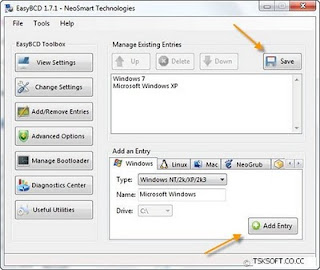
5) Download and Install EasyBCD on your Windows 7 to add boot entry for XP.
6) Launch the app and go to Add/Remove Entries. Under “Add an Entry” open the Windows tab and select the Type as “Windows NT/2k/XP/2k3”.

Give it a name like ‘Windows XP’ and click on ‘Add Entry’. Then select Save.
That’s it. Now restart you PC and you’ll be presented with two options, Windows 7 and Windows XP. :D   Select the one which you want to work on.
[Read more]

Panda Antivirus Pro 2010 – Free 3 months subscription

Posted On // Leave a Comment
Panda is offering a Free 90 days Trial of Panda Antivirus Pro 2010 on its 20th anniversary, as an exclusive offer for Microsoft users but you can also grab it.

Panda Antivirus Pro 2010 is the easiest-to-use and most intuitive protection for your computer. Just install it and forget about viruses, spyware, rootkits, hackers, online fraud and identity theft. Chat, share photos and videos, bank and buy online, read your favorite blogs or simply surf the Web, with complete peace of mind.
 Panda Antivirus Pro 2010
To get a free license, visit this Promotion page and click the ‘Download Free’ button to download Panda Antivirus Pro 2010. You do not need to register or enter any license key because the license is integrated in the installer.
Compatible with – Windows XP/Vista/Windows 7
via  [Megalab.it]
[Read more]