How to set up Blogger custom domain with GoDaddy

Posted On // Leave a Comment
Hi Friends,one of my friend and blogger...! Has transferred is blogger  to Wordpress and got a .com Domain from godaddy.com,so...it helped me think about it and  write this article on my blog.I think it may help you..! :)

How to set up Blogger custom domain with GoDaddy
Here are few simple steps to set up a custom domain from GoDaddy to point on your Blogger blog. I select GoDaddy’s domain since they are one of  the cheapest domain register on the web.First let’s discuss on how we can set up a Blogger/Blogspot blog custom domain with GoDaddy, then I’ll be discussing on my next post on how to set up the custom domain on Blogger.


1. Log in to your account at www.godaddy.com.
2. Open the Domains tab and select My Domain Names. You'll be directed to the Domain Manager page.
3. Click the domain that you'd like to use with your blog.
4. Click the Total DNS Control And MX Records link at the bottom of the section entitled Total DNS.
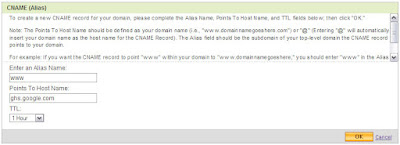
5. Look for a record prefixed "WWW". If there isn't one, add a new CNAME record; if there is one, you'll need to edit this record instead.
6. For the Name, enter only the subdomain of the address you want to use for your blog. For example, if you picked www.mydomain.com as your address, enter “www” here. (you can leave it as is)
7. Enter ghs.google.com as the Host Name. Specify a TTL or use the default setting of 1 hour.
8. Click OK, and then click OK again.
Example Image Below
How to set up Blogger custom domain with GoDaddy
If you are getting confuse on what to fill up on Step 6, personally I don’t modified it and leave it as is “www” since it is just a “name” for that set up and when you are not hosting your Blogger blog then it has no bearing at all. I think it will be necessary if you will be handling or hosting a site with subdomains, labeling as alias is great to organize your domain set up. So basically you just need to modify “Host Name” by entering “ghs.google.com”.

Now it is advisable that you set your URL with appended “www”, like Example http://www.tsksoft.com than http://tsksoft.com ,("Please Note That(www.tsksoft.com)Is Just An Example Domain Name And "TSKSOFT" Don't Have Self-Hosted Domain Yet").

Here are few steps to set it up on GoDaddy;

1. Log in to your account at www.godaddy.com.
2. Open the Domains tab and select My Domain Names. You'll be directed to the Domain Manager page.
3. Click the domain that you'd like to use with your blog.
4. Find Forwarding and click Manage.
5. Enter your URL with appended “www” as www.yourdomain.com, then tick “Update my DNS settings to support this change. (Recommended)”, clicking the “Advanced Option” will show you that your URL is permanently forwarded (permanent redirect 301) to your specified www.yourdomain.com.
5. Click OK.
Example Image Below

You need to wait for few minutes to test if your forwarding is working; you can check it by typing to your browser address tab your URL without appended “www” (http://yourdomain.com) then you’ll see if the page load the URL will be automatically change to http://www.yourdomain.com.

If you’re encountering troubles setting up this process, you may leave your questions & comments on the comment form below and I’ll try to answer it as soon as possible!! :)

And Friends,Please pass your valuable feedback through comments...! :)
[Read more]

How to Make Your WordPress or Blogger Blog DoFollow

Posted On // Leave a Comment

What does becoming DoFollow mean? It simply means that you are allowing each commenter’s links in your comments section to be nofollow free. It is like a reward to the people who take the time to leave a comment on your website, allowing their links to be fully useful when search engines crawl your post.
So how do you make your blog DoFollow?
Self-Hosted WordPress Blogs
For self-hosted WordPress users, it is pretty easy. Simply go to your Dashboard > Plugins > Add New and search for DoFollow. You should receive a list of current DoFollow plugins that you can simply install and activate. Once activated, these plugins automatically make all of the commenters’ links (past and future) DoFollow.
Blogger / Blogspot Blogs
For Blogger / Blogspot blogs, you will need to do a few things. First, under settings, allow Anonymous users to comment. This is the only way your commenters will have the Name / URL option. Then, go to your Layout tab > Edit HTML. From here, you will need to Download Full Template, which will be an XML file.
Open the XML file in a text editor. Just in case there are any problems, first save a backup copy of your template. Then do a search by using CTRL+F and search for "nofollow". You will find two lines that which you should delete the  rel=’nofollow’  from the below code...!


<a expr:href='data:comment.authorUrl' rel='nofollow'><data:comment.author/></a>


<a expr:href='data:backlink.url' rel='nofollow'><data:backlink.title/></a>

Save your template xml, and then upload it. Now your Blogger / Blogspot should be free of nofollow links.
[Read more]

Falcon Blogger Template : Converted Wordpress Template

Posted On // Leave a Comment
Hi Friends,This Template Is A Wordpress Template And By The Help Of A Friend And Blogger Krishna . The Template Has Been Converted Into Blogger Template.So,You can Use It For Blogger


This Blogger Template is very professional blogger template that is converted from word press theme to blogger with great effort. It has all things you are looking for like Clean Read more posting, Search box, and RSS , Ready Social Widgets, Twitter Widgets,Ad Banner, Featured Posts and more....

Template Information:

Template Type : Blogger Template
Template Name : Falcon Blogger Template
License : Free Template + Creative Common License
Converter : BloggerTheme
WP Designer : Web2Feel


Please Pass Your Valuable Feedback Through Comments...


And Please Use "CTRL" When Clicking The Preview Or Download Button,To Open In A New Window....!
[Read more]

Game Craft: Wordpress Template for gamer blogs and movie blogs

Posted On // Leave a Comment

Hi Friends This Is Our First Wordpress Template Posting Here And It Is One Of My Favorite Template...!

Releasing a New Wordpress Theme For Gamer Blogs and Movie Blogs. The name of the theme is "Gamecraft". The theme is WordPress 3 compatible with custom menu feature, custom post thumbnail, jQuery featured post section, featured video, Twitter updates, Banner ads, adsense etc. The theme also has an options page from where you can configure different custom settings.
Please Use "CTRL" When Clicking The Preview Or Download Button,To Open In A New Window....!
And Friend's Please Pass Your Valuable Feedback Through Comments...


[Read more]

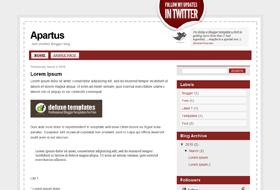
Aparatus: Free Premium Blogger Template

Posted On // Leave a Comment

Blogger Template: AparatusAparatus is a free premium like Blogger template which is packed with features and design delight that aims to tickle your innermost web mag fancy.

Features: 2 columns, twitter icon , fonts and colors are fully customizable, pages are enabled and it has twitter pre installed
[Read more]

Where To Find Free Legal Content For Your Blog

Posted On // Leave a Comment
Hello there! If you are new here, you might want to subscribe to the RSS feed for updates of this site.


Article: Are You Looking For Free, Legal Blog Content?

It happens to the best of us. In order to provide our readers with quality content, we may want to supplement our original content with free, legal blog content.
Surprisingly, I found a lot of options in the area of free, legal blog content from images, to articles, to multimedia. You would also be taken back at the size and scope of these massive, online libraries.
Note: Please pay close notice to some of the licensing requirements to use this concept, but in all, look to find many people eager have their work become apart of your blog.

Let me provide you a short list of some of the better sites I discovered:

And again, there will be no copyright conflicts down the road:
newsroom logo Where To Find Free Legal Content For Your Blog
YouTube gets most of the glory when it comes to embedding video, but Voxant Newsroom has been steadily building a huge library of professional-quality videos, images and articles for easy embedding into other sites. You can find material from the Associated Press,Reuters, CBS, the BBC and many more. They also have content from dozens of local TV news programs making it a great choice for local bloggers.
flickr logo Where To Find Free Legal Content For Your Blog
Though almost every blogger is aware of Flickr and its powerful photo management tools and wealth of Creative Commons-licensed images on the site, fewer are aware of the WordPress plugin PhotoDropper, which allows users to search for and embed Flickr images all from the post editing page. Best of all, PhotoDropper formats the photo and the attribution correctly, ensuring that the use meets the terms of both Flickr’s terms of use and the Creative Commons License.
open source audio logo Where To Find Free Legal Content For Your Blog
The Web Archive, in addition to being a great resource to see what Google looked like in 1998, has one of the largest libraries of audio available for reuse. Its Open Source Audio section has over 150,000 tracks of all varieties licensed under different Creative Commons Licenses.
hulutm 130 Where To Find Free Legal Content For Your Blog
If you want to embed video from some of your favorite television shows, Hulu provides one of the easiest ways to do it. With over fifty content partners including NBC, Fox and MGM, you can find and embed clips from favorite shows, both current and past. You can even trim the clips to focus in on just the part that you want, ideal for making a point about a particular point or event.
articlesbase logo Where To Find Free Legal Content For Your Blog
For text content, Articlesbase is usually the site to search first. In addition to having some 400,000 articles available for republishing, the site makes it very easy to search for and embed the content, even providing HTML versions of the text. As with most free article sites, the quality of the content varies wildly, but the site does have a reputation system to help you find good authors. Please be careful to obey the publisher terms of use when re-posting articles and, as always, double check to make sure that the content is original before posting it.
sxc logo Where To Find Free Legal Content For Your Blog
If you need excellent quality and high-resolution stock photography quickly, the stock.xchnge is easily one of the leaders. With over 350,000 images, many available for commercial use without attribution, the site itself is easily searched but one has to be careful both to obey the licenses for each image, which can vary from work to work, and to ensure that any work with a recognizable person has an appropriate model release before using it commercially.
wikimedia logo Where To Find Free Legal Content For Your Blog
With over 2 million media files, including images, videos, audio and e-Books, all available under Creative Commons, open source or public domain licensing, Wikimedia commons is a great resource for anyone looking for media to use. Though commonly thought of as just another part of Wikipedia, files placed into the Wikimedia Commons are available for use by anyone and the site is easily searchable.

Conclusion

If you’re looking for free, legal content for your site, there are many sources available to you. Whether you are seeking to embed the content or host your own, there are resources available to help you get the content you need without worrying about either copyright or payment.
Use of these sites, hopefully will encourage legitimate and fair reuse of content so that fewer people will be tempted to plagiarize and outright rip off artists and authors.
Do not be concerned over exposing your readers to outside content that is not an original work of your own. You know your readers and you know what type of material appeals to them – and they will appreciate it regardless.

Please Pass Your Feedback Through Comments.....!
[Read more]