10 Rare Blogger Tips And Tricks For Blogspot Bloggers

Posted On // Leave a Comment
blogger blogspot tips tricks
Hi friends i thought to write this post and share these article with you about "10 rare blogspot tips and tricks" I've picked up from other bloggers or learned from my experience with blogspot.

Before we move on to the tips I must say that compared to other free blog services, blogspot is better, simple, powerful and gives you a lot of freedom and flexibility. But when you go on using it you notice it is very crude and lacks many features. I think these 10 tips will greatly help you over come those short comings in blogspot and give your blogspot blog a more professional look. So here are the 10 blog tips for your blogspot blog. Please use the comments to let me know if you want to know more about any of these tips and also to add your own tips and tricks for blogspot bloggers.


1. How to track All recent commentsFor most blogspot users tracking and responding to recent comments is a major problem. But there is a easy way to track your most recent comments left anywhere in your blog, be it in your latest post or in a old post somewhere in the archives. Blogspot provides a aggregated comment feed where you can see your blog's 25 most recent comments.

The comment feed URL for your blog is:
YourBlogName.blogspot.com/feeds/comments/full

E.g. Comment feed for TSKSOFT blog is:
http://tsksoft.blogspot.com/feeds/comments/full


2. Add a Menu Bar A menu bar helps visitors navigate a blog easily and also gives it a professional outlook. Beautiful Beta explains

3. Remove the nav bar The navigation or nav bar at the top of blogspot blogs is a eyesore and makes the blog look unprofessional. It can also cause a lot of trouble because of visitors clicking the "notify objectionable content" button, which will make your blog to be suspended for day's or even weeks until cleared by Blogspot administrators. You can get rid of the nav bar by making the simple modification explained in this post.

4. Change blog post title tagsYou can be losing a lot of potential search traffic because of the default way Blogspot displays blog post heading in search engines. To overcome this you must change your blog post title tag from the default: "Blog name" + "Post title" to appear as "Post title" first and then the "Blog name" in search engine.
 

5. Install a blog traffic counter Blogpost not having a inbuilt traffic counter is a major short coming. So make sure you install at least a basic traffic counter in your blogspot blog. I have installed both SiteMeter and Google Analytics to track and analyze visitors to this blog.

6. Best way to stop spam comments 
Spam comments is a major problem in blogspot. I find the best way to fight spam in blogspot is to enable "word verification" for comments. Ever since did it I haven't got a single spam comment. To do it, go to your blog Dashboard's "Settings" tab section and enable "word verification" for comments.

7. Minimise or Remove Site wide Links & Blogrolls Google can be a huge traffic driver to your blog and the PageRank Google assigns to your blog has a huge impact on the amount of traffic you get from Google. As Google PageRank is calculated from the number of incoming and outgoing links to your blog, sitewide links and huge blogroll in your sidebar reduce your PageRank. So it's better if you have a separate blog post for Related Links and Blogroll and link to those posts from the menu bar or side bar.

8 Insert AdSense inside Blog Posts 
If you are thinking of making money from ads in blogspot blogs this will be invaluable. AdSense ads are reported to perform best when they are placed inside blog post, specially between the post title and content.

9 Add social bookmark links after every post Social Bookmarking sites like Digg, Stumble Upon etc. can be a huge traffic generator to your blog. So why not induce readers to bookmark and market your blog post by placing a link to these sites after every post.

10. Beware of free blogspot templates There are hundreds of free blogspot templates available in the internet. But be very selective when you choose a template for blogspot blogs. I've read about many complains from bloggers who have implemented third party templates having blog display problems and not getting indexed properly in search engines etc. due to bad code designs. Even India's ace blogspot blogger, Digital Inspiration is having problems with search engines due to his template. So I think it's wise to go for one of the default templates provided by blogspot. Thanks to the new facilities provided by the new blogger you can always make simple changes like put in a banner image etc. and make your blog standout in the crowd.

Hmm.... At last,Please pass your valuable feedback through comments on this article and let us know what do you think. 
Have a nice day...!
Happy blogging.
[Read more]

Top 5 Internal Link Building Strategies

Posted On // Leave a Comment

If you are serious blogger you might have known the importance of Internal link bulding.You should build links to internal pages. Building strong internal blog links is very important in terms of SEO. Thus boosting your blog traffic. Internal link building helps to increase pageviews.
1. First of all make sure that your navigation on your web page is spiderable. Use (anchor text ) a text based navigation, or an image based navigation with SEO relevant alt attributes attached to each image link. I recommend you to read about importance of Dofollow blog. 
2. Breadcrumds are a great internal linking tool.Use them for usability and anchor text differentiation.
3. Content links not only tend to have higher click through rate and perceived trust,but are also able to add relevance to a link because of the text.
4. Generate an sitemap for your site. A informative sitemap is useful for your visitors and search engines.
5. Link to the most relevant pages on important pages of your website. Always try to link to important pages on every topic relevant page on your website.Try adding Related post widgets in Blogger |WordPress this help easy navigation to related articles within your site.
I hope this post will be useful to boost your blog pageviews and blog traffic.
Please post your valuable feedback through comments.
Have a nice day....!
[Read more]

How To Auto-Submit Your Content Feed To Digg

Posted On // Leave a Comment


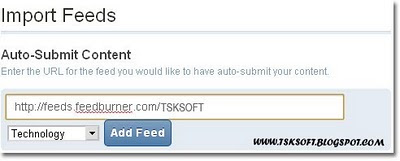
Digg has recently introduced a new feature called “Import Feeds” in new Digg v4 Alpha . This “Import Feeds” option lets you to submit blog feeds to Digg so that you don’t have to manually submit your site’s post to Digg.Thus, whenever the blog is updated that post will be published in Digg automatically.Cool isn’t it ? :)


Auto-Submit Your Content Feed To Digg

1. Login to http://new.digg.com
2. Goto Settings –> Import Feeds
3. Now Enter the Feed URL you would like to have auto-submit your content.


4. Select a category and click Add Feed.
5. You will get a verification code.Insert it into next post.
6. Publish the blog post.
7. Click verify now in Digg.
That’s it :) Drive huge amount of traffic from Digg. ;)
I think these post helped you...!
And please pass your valuable feedback through comments.
Have a nice day...!
[Read more]

Free Professional Techcrunch Like WordPress Theme – CompPress

Posted On // Leave a Comment
If you are a TechCrunch fan, you would be interested in making your blog looks like TechCrunch. And if you are on wordpress blogging platform then I must say you are lucky enough to grab a TechCrunch like wordpress theme for free! :) It’s called as CompPress released by CompTalks.


Top Features of Comppress Theme:
  • Neat and Clean Theme
  • Social Plugins – Tweetmeme, Facebook like and Google buzz.
  • Featured Image option
  • Change the logo from admin panel
  • Change the background of the logo from admin panel
  • Change the background image of the theme from admin panel
  • 728×90 Ad placement near the logo
  • Tabbed box in the sidebar for Popular , Recent and Random Posts (with thumbnail)
  • Inbuilt Feedburner Subscription box
  • 125×125 Ad boxes for private ad sales or affiliate banners
  • Two WordPress 3.0 dropdown menus
  • Author Box in the post page to display the author credentials
  • Threaded Comments
  • Widgeted sidebar
  • Widgeted Footer
  • It cost only $0.00. Yeah, it’s free! :)
Screenshot:

Demo | Download

Please pass your valuable feedback through comments
Have a nice day...!
[Read more]

10+ Best Free File Hosting Service Providers For You

Posted On // Leave a Comment

Most of us like to store our files online and share it to our friends and family. Files include documents, images, videos and files in other format.file hosting services are very benefited to bloggers or webmasters too as they can share their resources to their visitors and readers!
Following is the list of 10+ Best Free File Hosting Service Providers you can use to store and share your files! 


FileFactory

10+ Best Free File Hosting Service Providers
  • No file type restrictions.
  • Files can be up to 300MB in size.
  • Upload up to 25 files at once.
  • Upload faster with Turbo.
  • Embed widget or music player.
  • Share files on blogs, forums, Facebook or MySpace.
  • Mix images into slideshows.
  • Earn reward for sharing popular files.
  • Earn up to $10 per 1,000 downloads.

MediaFire

10+ Best Free File Hosting Service Providers
  • Unlimited storage
  • Up to 100MB per file
  • Unlimited uploads
  • Unlimited downloads
  • Unlimited bandwidth
  • Image galleries
  • No sign up required
  • No software to install

FileSavr

10+ Best Free File Hosting Service Providers
  • Fastest and easiest file hosting service as an alternative to sites like MegaUpload and RapidShare.
  • Do not force users to sign up for paid accounts to download files.
  • Do not show long countdown timers, pop up ads, or any other spam related activities.
  • Upload size is 10 GB

FileQube

10+ Best Free File Hosting Service Providers
  • Store up to 2GB free for remote file access.
  • Organize, tag, search and move files and folders easily.
  • Share files and images with friends, peers or family
  • Limit access to resources with password-protection features
  • Publish your photos, documents, audio, or video anywhere
  • Create custom rss-feed for every folder you share to give your visitors ability to track updates.
  • Tag your resources for more order and faster search.
  • Instantly share your files with others – skipping download page.

FileDen

10+ Best Free File Hosting Service Providers
  • Hotlinking allowed for all allowed file extensions, including videos and music files.
  • 1GB of personal storage space.
  • A 50mb maximum file size limit.
  • 5GB of monthly bandwidth.

SaveFile

10+ Best Free File Hosting Service Providers
  • 100MB Filesize
  • Unlimited Diskspace
  • Unlimited Traffic
  • Sorted by Projects
  • Password Protection
  • Replace Files
  • File Statistics
  • Project Statistics
  • User Subscriptions

FileHosting

10+ Best Free File Hosting Service Providers
  • Unlimited file hosting.
  • 2 GB/sec bandwidth.
  • 20 highspeed server.
  • You can upload any type of file (movies, music, documents, images, zip files and more).
  • Any file in any format can be uploaded and downloaded for free.
  • No file size limit.
  • No restrictions on the number of times a file can be downloaded.
  • Keep your files private, or send your download links only to friends or family.
  • Share your download links on blogs, forums and social networking sites.

Uploading

10+ Best Free File Hosting Service Providers
  • Download speed limited
  • Maximum parallel download – 1
  • Maximum upload size per file – 100 Mb
  • Download limit per 24 hours – 300 Mb
  • Wait time before the download begins – 60 seconds
  • Earn cash with your files.

WikiUpload

10+ Best Free File Hosting Service Providers
  • Upload any files upto 5GB that do not violate their Terms of Service
  • Share files on forums or with friends
  • If your file is public, they also place the file in right public category based on your tags and description

FileSend

10+ Best Free File Hosting Service Providers
  • 300 MB file size limit
  • Manage uploaded files
  • Recover lost file links
  • Less download wait time

FileSave

10+ Best Free File Hosting Service Providers
  • 100% Free
  • Upto 1Gb Free Disk Space
  • Upto 1Gb Per File
  • No Sign Up Required
  • Upload Music, Videos, and all other files.
  • Share with your friends

InfiniteMB

10+ Best Free File Hosting Service Providers
  • Free File Image Audio Video
  • 500Mb per file
  • Highest Upload Speeds
  • Unlimited Downloads
  • Share files via e-mail, forums, MySpace, etc.

ZippyShare

10+ Best Free File Hosting Service Providers
  • Completely free, reliable and extremely popular.
  • Extremely fast download speeds.
  • The maximum filesize for a single file is 100 MB.
  • The file can be downloaded at any time and as often as you need it.
  • File Life: 30 days after no activity.
  • No ridiculous queues.
  • No limits.

Box

10+ Best Free File Hosting Service Providers
  • 5 collaboration folders
  • 1 GB of storage
  • 25 MB file uploads
Hope this post was useful to you! Drop Comments!
Have a great time!
 
And have a nice day..!
[Read more]

LK Magazine v3 Premium Blogger Template

Posted On // Leave a Comment
This is the Third version of LK Magazine Blogger Template Series.These template is by "Premium Templates" Has corrected  many weaknesses of LK magazine v2 blogger template and add some features from Prozine Blogger Template to this template.To configure this template correctly, read the instruction given below.Like LK Magazine v2 blogger template,I think you will like this blogger template very much.The features of this template as given below.

Template Features
  • Column: 4 Columns/3 Sidebars/Right Sidebars/Left Sidebar
  • Fixed Width Template (1000px width)
  • 2 Horizontal Navigation Menus
  • Auto Read More Feature with Thumbnails.
  • 468*60 Header Ads banner
  • 125*125 Sidebar Banners
  • 468*60 Header Logo with the PSD file and Fonts.
  • 1 CSS Search Box
  • 1 Multi Tab View Widget installed.
  • 1 Featured Auto content slider installed.
  • 3 Column Footer section
  • Facebook Like Button installed.
  • SEO friendly blogger title hack installed to help you rank higher in Google
  • Blogger Default Heading Tag has Changed for better SEO
  • Meta tags installed
  • Top Bar with Feed buttons and Display Day,Month,Year
  • Hosted images on blogger. Free use forever!
  • Favicon support so you can add your own url icon
  • Compressed CSS to speed up your page load times
  • Embedded JavaScript date code showing current day
  • Built-in Related Posts Widget to show Related posts
  • Numbered Page Navigation Hack Installed
  • Replace "Older Posts","Home","Newer Posts" Text Navigation with Images
  • Automatically highlight author comments
  • Modified Comments Section to Enable Avatars in Blogger Comments
  • More ...


Template name : LK Magazine version 3

Template type : 3 Sidebar, 4 Column, 3 Column footer, Featured Section, Fixed width, Header Banner, Left Sidebar, Magazine, Premium, Right Sidebar, Slider, Tabbed widget, Top Navigation Bar, White

Release date : 08-29-2010


Template Layout Structure


3 Column Footer Section


Template Customization


Basic Template Installation:

1.First download the template and unzip the file.

2.Now, sign in to Blogger dashboard and click on the layout.

3.Here is the important step, after uploading any new Blogger template, all of the previous widgets like your google adsense ads,text,profile,poll,etc etc will be lost.
So, to avoid this to happen, in this step click on 'edit' on all the widgets and copy the codes into notepad,etc.

4.Now click on the 'Edit html' tab

5.First of all please Download Full Template.This is to back up your present template.If the new template that you are going to upload makes/gets into some errors or if you make more complex errors in that,then you will loose everthing.So make sure that you back up your template.

6.Just below that,there's an option of uploading new template.So, use the Browse button and upload the downloaded xml file.

7.Now, a message appear saying that your widgets are about to be deleted.Click on the Confirm & Save (no problem doing this because we already copied the widget codes in Step 3).

8.Now click on "confirm and save".Now you successfully installed the template.

8.Click on the 'Page elements' page now and add the codes that you copied in step3 using the 'Add a Page Element' option.

Configure Meta tags

Login to your blogger dashboard--> layout- -> Edit HTML.Now Scroll down to where you see below codes :


<meta content='DESCRIPTION HERE' name='description'/>
<meta content='KEYWORDS HERE' name='keywords'/>


Replace DESCRIPTION HERE,KEYWORDS HERE as below.

DESCRIPTION HERE:Write your blog description
KEYWORDS HERE:Write the keywords of your blog separated by comma.

Configure First and Second Navigation Bar

Login to your blogger dashboard--> layout- -> Edit HTML.Now Scroll down to where you see below code:


<li><a href='Your-Link-Here' title='Link-Title'>Link-Name-X</a>


Now Replace Your-Link-Here,Link-Title,Link-Name-X with your details.

Configure Header logo

Login to your blogger dashboard--> layout- -> Edit HTML.Now Scroll down to where you see below line :


https://blogger.googleusercontent.com/img/b/R29vZ2xl/AVvXsEjtW3cj8hzd9XdP1LHWGaOFqv5ZZ0sw1YnI2jgPvtG-lbaHh6OXv5t3SvfGzoxiQteJNAFha3mzbGGBHb69YExtvNcadxI9UyJ-qwMhOOaayLRqZk76t6LQHGGs9Dgnwi8f7FvzTZMyC6M/ Magazine v3 logo.png


Now replace it with your logo address/url.

Configure Subscription Box:

Add this code into the HTML/JavaScript box.


<div class='subsboxfull'>
<a href='your-twitter-url' rel='nofollow' target='_blank' title='twitter'><img src="https://blogger.googleusercontent.com/img/b/R29vZ2xl/AVvXsEg3kpW0aRGdrBYRKoJSUj7nW7mMuEFD2HXT2Nppsk5r0hlo4I7MhN-xHc3X2WB4xnRam9fOfpfk0EpRjhLWxca9sb4QcfWVFUOqk1yz7GdLMBKKdyhuZY3KsHQsWFycw89Z2G3GhAUlmZs/" /></a>
<a href='your-facebook-url' rel='nofollow' target='_blank' title='facebook'><img src="https://blogger.googleusercontent.com/img/b/R29vZ2xl/AVvXsEiQjEANC3d5tdbN05YLDvNt6z7C9EBXWKEGXlTb_yFl8FbmdXzBHYlNTxAj7Eo7pNBJpJFv1AYQh3lBGFuyj5LbqC6JVcBw4E0cS-ptsPInVODTdXXSgrxyq36vEkUOg8sVv7rFXXOY_yI/s1600/facebook--box.png" /></a>
<a href='your-delicious-url' rel='nofollow' target='_blank' title='delicious'><img src="https://blogger.googleusercontent.com/img/b/R29vZ2xl/AVvXsEiQysK2vFlcfAvIXLf6VBWU6sRRARPlgQy_EZowscjh8pFtsOmhztjtq7-K6T9uIesSolk-53DdJkR-LT1EnJ64m6NUR8io27Xxn2x7Y1Ytm4uzfFF6ERnK2GUfTZSeCO5A2kGnw4PSnco/s1600/delicious-box.png" /></a>
<a href='your-stumbleupon-url' rel='nofollow' target='_blank' title='stumbleupon'><img src="https://blogger.googleusercontent.com/img/b/R29vZ2xl/AVvXsEiFoDA_Dkc5t51NZ_CxGi6xFfcD6yx_N4gUeroUsr2GS-cCp8CAHqSmk4UtQAL53EoxF_hChCY8SBci0_o4B3YTqC4n0GqRrp-7WRGDx4OWsj10NjvWyJbYXxYxX2qBt-MCfKqtGYwEuGg/" /></a>
<a href='your-linkedin-url' title='linkedin'><img src="https://blogger.googleusercontent.com/img/b/R29vZ2xl/AVvXsEiUY7tz93zrumIozm4DIWOOZezt_d1B5soS-Oj16L4UEoc_i__Ydg22BQUW6zb9Wy5su-zniQo4JXvUrcCSzC8mAp07E9H0ympKjvsi3bPwln25bogvLbamyPoE5oMFlOBXG853eiCu5YY/" /></a>
<a href='your-contact-url' title='contact'><img src="https://blogger.googleusercontent.com/img/b/R29vZ2xl/AVvXsEhmkCZxHn4P-bzmGF-Myg29ojBmriJLnZwSmmcYBTecKgtEypRGdPWXveM3yUP8dwuB3yrcfshnQe6Q45K0yL4LaFNFR5aZehNxf0n70_h49fNBtbzbLvxjirjVNWmRnL_w0VnCOR2K_F4/" /></a>
<form action='http://feedburner.google.com/fb/a/mailverify?uri=YOUR-FEEDBURNER-ID&loc=en_u' method='post' onsubmit='window.open(\'http://feedburner.google.com/fb/a/mailverify?uri=YOUR-FEEDBURNER-ID', \'popupwindow\', \'scrollbars=yes,width=550,height=520\');return true' target='popupwindow'><p><input name="email" style="width:230px; border: 1px solid #ccc; padding: 5px;" type="text" value="Enter your email address" /></p><input name="uri" type="hidden" /><input name="loc" type="hidden" value="en_US" /></form>
<p><span><a class='rss-boxicon' href='http://feeds2.feedburner.com/YOUR-FEEDBURNER-ID' rel='nofollow' target='_blank'>RSS</a></span> <span><a class='email-boxicon' href='http://feedburner.google.com/fb/a/mailverify?uri=YOUR-FEEDBURNER-ID&loc=en_u' rel='nofollow' target='_blank'>Email</a><span><span style="float:right;"><a href='http://feeds.feedburner.com/YOUR-FEEDBURNER-ID' rel='nofollow'><img alt="" height="26" src="http://feeds.feedburner.com/~fc/YOUR-FEEDBURNER-ID?bg=ff9900&amp;fg=000033&amp;anim=0" style="border:0;float:right;margin-top:0px;" width="88" /></a></span></span></span></p> </div>


Now Replace,
your-twitter-urlyour-facebook-urlyour-delicious-urlyour-stumbleupon-urlyour-linkedin-url,your-contact-urlYOUR-FEEDBURNER-ID with your details.


Configure Multi Tab view widget:

Add this code into the HTML/JavaScript box.


<div id='tabzine'> <ul class='tabnav'> <li class='pop'><a href='#tab11'>Video</a></li> <li class='fea'><a href='#tab22'>Recent</a></li> <li class='rec'><a href='#tab33'>Popular</a></li> </ul> <!-- tab1 --> <div class='tabdiv' id='tab11'> ENTER-TAB-1-CONTENT-HERE </div> <!--/tab1--> <!-- tab2 --> <div class='tabdiv' id='tab22'> ENTER-TAB-2-CONTENT-HERE </div> <!-- tab2 --> <!-- tab3 --> <div class='tabdiv' id='tab33'> ENTER-TAB-3-CONTENT-HERE </div> <!-- /tab3 --> </div>

Now Replace,
ENTER-TAB-1-CONTENT-HEREENTER-TAB-2-CONTENT-HEREENTER-TAB-3-CONTENT-HERE with your contents.

How To Add Search Box

Add this code into the HTML/JavaScript box.


<div id='search' style='display:inline;'> <form action='/search' id='searchform' method='get'> <input id="s" name="q" type="text" value="" /> <input id="searchsubmit" type="submit" value="Search" /> </form> </div>

How To Configure Favicon:

Login to your blogger dashboard--> layout- -> Edit HTML.Now Scroll down to where you see below code:


<link href='YOUR-FAVICON-URL' rel='shortcut icon' type='image/vnd.microsoft.icon'/>

Now replace "YOUR-FAVICON-URL" with your Favicon address/url.


Configure Featured Content Slider:

Add this code into the HTML/JavaScript box.


<script type="text/javascript"> stepcarousel.setup({ galleryid: 'mygallery', //id of carousel DIV beltclass: 'belt', //class of inner "belt" DIV containing all the panel DIVs panelclass: 'panel', //class of panel DIVs each holding content autostep: {enable:true, moveby:1, pause:3000}, panelbehavior: {speed:500, wraparound:true, persist:true}, defaultbuttons: {enable: true, moveby: 1, leftnav: ['https://blogger.googleusercontent.com/img/b/R29vZ2xl/AVvXsEjXp1aBk3R0kUYhaPXbELjta0U5DE88fRsyWf5RXCHDz2NmOBLgiXnwL31e3Z0g9hE_E5lA_rtXQ9eU9XWWqIyYhn_0m4BgjBKG5stay3ldmtiHm18B_J_MaVCi5Dgk6txFjg3yO6Qe7IA/', -29, 90], rightnav: ['https://blogger.googleusercontent.com/img/b/R29vZ2xl/AVvXsEh94rBGdhtJXw8x2sf-OWXFV75nC_wkkqgxS2SXwIYBgB_sjhyphenhyphenyvOmyvfApCJqybJgczWX56MrHBgbeUhrIcCMdZY_5YBA3NbFrjRb7AEI8hk0YGiOnLPHpYJ0O3VL7brx0Pyh_f1uU77A/s1600/fleche2.png', -18, 90]}, statusvars: ['statusA', 'statusB', 'statusC'], //register 3 variables that contain current panel (start), current panel (last), and total panels contenttype: ['inline'] //content setting ['inline'] or ['external', 'path_to_external_file'] }) </script> <div id="slider"> <div id="mygallery" class="stepcarousel"> <div class="belt"> <div class="panel"> <img src="Slider-1-Image-Address-Here" alt="" /> <h2><a href="Slider-1-Link-Here">Slider-1-Title-Here</a></h2> <p>Enter-Slider-1-Description-Here</p> </div> <div class="panel"> <img src="Slider-2-Image-Address-Here" alt="" /> <h2><a href="Slider-2-Link-Here">Slider-2-Title-Here</a></h2> <p>Enter-Slider-2-Description-Here</p> </div> <div class="panel"> <img src="Slider-3-Image-Address-Here" alt="" /> <h2><a href="Slider-3-Link-Here">Slider-3-Title-Here</a></h2> <p>Enter-Slider-3-Description-Here</p> </div> <div class="panel"> <img src="Slider-4-Image-Address-Here" alt="" /> <h2><a href="Slider-4-Link-Here">Slider-4-Title-Here</a></h2> <p>Enter-Slider-4-Description-Here</p> </div> <div class="panel"> <img src="Slider-5-Image-Address-Here" alt="" /> <h2><a href="Slider-5-Link-Here">Slider-5-Title-Here</a></h2> <p>Enter-Slider-5-Description-Here</p> </div> </div> </div> </div> <div style='border-top:1px solid #050505;border-bottom:1px solid #353434;height:0px;width:100%;'/></div>

Now Replace Slider-X-Image-Address-Here, Slider-X-Link-Here, Slider-5-Title-Here, Enter-Slider-5-Description-Here with your contents.Look at the example below:


<script type="text/javascript"> stepcarousel.setup({ galleryid: 'mygallery', //id of carousel DIV beltclass: 'belt', //class of inner "belt" DIV containing all the panel DIVs panelclass: 'panel', //class of panel DIVs each holding content autostep: {enable:true, moveby:1, pause:3000}, panelbehavior: {speed:500, wraparound:true, persist:true}, defaultbuttons: {enable: true, moveby: 1, leftnav: ['https://blogger.googleusercontent.com/img/b/R29vZ2xl/AVvXsEjXp1aBk3R0kUYhaPXbELjta0U5DE88fRsyWf5RXCHDz2NmOBLgiXnwL31e3Z0g9hE_E5lA_rtXQ9eU9XWWqIyYhn_0m4BgjBKG5stay3ldmtiHm18B_J_MaVCi5Dgk6txFjg3yO6Qe7IA/', -29, 90], rightnav: ['https://blogger.googleusercontent.com/img/b/R29vZ2xl/AVvXsEh94rBGdhtJXw8x2sf-OWXFV75nC_wkkqgxS2SXwIYBgB_sjhyphenhyphenyvOmyvfApCJqybJgczWX56MrHBgbeUhrIcCMdZY_5YBA3NbFrjRb7AEI8hk0YGiOnLPHpYJ0O3VL7brx0Pyh_f1uU77A/s1600/fleche2.png', -18, 90]}, statusvars: ['statusA', 'statusB', 'statusC'], //register 3 variables that contain current panel (start), current panel (last), and total panels contenttype: ['inline'] //content setting ['inline'] or ['external', 'path_to_external_file'] }) </script> <div id="slider"> <div id="mygallery" class="stepcarousel"> <div class="belt"> <div class="panel"> <img src="https://blogger.googleusercontent.com/img/b/R29vZ2xl/AVvXsEjMcHnjSiVzt79_WlCgSjIjdIE2Y66tIB_VZo4nhOp-J2mWHNFluXnrWIdMpDYL8QoBUdU5B2Js3FPfpQS1nR3G8-Zm0-keIQ-eYrIANQBmgeFB7fDRYPM2jpOaa-oya4vatBcJuD7Ixbg/s1600/slide1.jpg" alt="" /> <h2><a href="Slider-1-Link-Here">Slider-1-Title-Here</a></h2> <p>Lorem ipsum dolor sit amet, consectetuer adipiscing elit. Aenean commodo ligula eget dolor. Aenean massa. Cum sociis natoque penatibus et magnis dis parturient montes, nascetur ridiculus mus. Donec quam felis, ultricies nec, pellentesque eu, pretium quis, sem. Nulla consequat massa quis enim.</p> </div> <div class="panel"> <img src="https://blogger.googleusercontent.com/img/b/R29vZ2xl/AVvXsEilIx4X1wMofUKWOkyYkgDV8fFbKY3KmojXLRl8hEONBeJQZ2IW-xBiQfYnYJDYds3P7swRwlQ5B3lcz7d0t7rCMcA_YCFAwl4irMbE4pTAZB9oOJ00xfRCMs7wfjzAIetneQ_tawfTerk/s1600/slide2.jpg" alt="" /> <h2><a href="Slider-2-Link-Here">Slider-2-Title-Here</a></h2> <p>In enim justo, rhoncus ut, imperdiet a, venenatis vitae, justo. Nullam dictum felis eu pede mollis pretium. Integer tincidunt. Cras dapibus. Vivamus elementum semper nisi. Aenean vulputate eleifend tellus. Aenean leo ligula, porttitor eu, consequat vitae, eleifend ac, enim. Aliquam lorem ante, dapibus in, viverra quis, feugiat a, tellus. Phasellus viverra nulla ut metus varius laoreet.</p> </div> <div class="panel"> <img src="https://blogger.googleusercontent.com/img/b/R29vZ2xl/AVvXsEjcDSPtme4ZkOvXSUgt5G3ORTTaMF7_s1o6qoHXvRrUQCRAAtaSLX3SFKyebwbMpPSDmFoPFXoxUCtjoXEfMb3lAMePaoaLrJFmSTiE7ldoJjdSYwLNaDcoqd6SUo-fRYX67qOnAg7Pvgs/s1600/slide3.jpg" alt="" /> <h2><a href="Slider-3-Link-Here">Slider-3-Title-Here</a></h2> <p>Aenean imperdiet. Etiam ultricies nisi vel augue. Curabitur ullamcorper ultricies nisi. Nam eget dui. Etiam rhoncus. Maecenas tempus, tellus eget condimentum rhoncus, sem quam semper libero, sit amet adipiscing sem neque sed ipsum. Nam quam nunc, blandit vel, luctus pulvinar, hendrerit id, lorem.</p> </div> <div class="panel"> <img src="https://blogger.googleusercontent.com/img/b/R29vZ2xl/AVvXsEiG-tf0FzPANRRfyhfdLAbCx18EnkPmV6f1C3jzd_8QEq3FqekK4_1PwVUstFrgfj_ilOTDdrxq8FcaeX4BaDWhRcsxZMSBxXEabVET18OP444StusYblTQq5dezPB0jILRMUSHKzYhzyM/s1600/slide4.jpg" alt="" /> <h2><a href="Slider-4-Link-Here">Slider-4-Title-Here</a></h2> <p> dui quis mi consectetuer lacinia. Nam pretium turpis et arcu. Duis arcu tortor, suscipit eget, imperdiet nec, imperdiet iaculis, ipsum. Sed aliquam ultrices mauris. Integer ante arcu, accumsan a, consectetuer eget, posuere ut, mauris. Praesent adipiscing. Phasellus ullamcorper ipsum rutrum nunc. Nunc nonummy metus. Vestibulum volutpat pretium libero. Cras id dui.</p> </div> <div class="panel"> <img src="https://blogger.googleusercontent.com/img/b/R29vZ2xl/AVvXsEg87rGTDSa-Z9skWob6YogsvaHHp49ySNitC5x0QkgkkqAtP6v7nNTahOBu2Of2mJENjFaQ2qubuix8Wygtz8a_7gGNStcn1GRhVUTKvy41fR0M_BzCD0V-BDwiS4dE_bEzHlBBF_pFCWM/s1600/slide5.jpg" alt="" /> <h2><a href="Slider-5-Link-Here">Slider-5-Title-Here</a></h2> <p>Aenean tellus metus, bibendum sed, posuere ac, mattis non, nunc. Vestibulum fringilla pede sit amet augue. In turpis. Pellentesque posuere. Praesent turpis. Aenean posuere, tortor sed cursus feugiat, nunc augue blandit nunc, eu sollicitudin urna dolor sagittis lacus.</p> </div> </div> </div> </div> <div style='border-top:1px solid #050505;border-bottom:1px solid #353434;height:0px;width:100%;'/></div>

Configure "Blog Posts" Widget

Login to your blogger dashboard--> layout- -> Page elements.Click on "Edit" form "Blog Posts" Section.Now change it value as the picture below:

Important !!!:

Please do not remove the footer credit. I spend several hours to create this blogger template. So that you can use it for your blog. All I ask is, stay the credit intact.

License: 

This free Blogger template is licensed under the Creative Commons Attribution 3.0 License,which permits both personal and commercial use.
However, to satisfy the 'attribution' clause of the license, you are required to keep the footer links intact which provides due credit to its authors. For more specific details about the license, you may visit the URL below:
http://creativecommons.org/licenses/by/3.0/

Please Pass Your Valuable Feedback Through Comments....!

[Read more]