Who Invented The Personal Computer

Posted On // Leave a Comment

When you study the history of the personal computer, the records will show that Ed Roberts was the first to use the term. He used it to describe his invention, the Altiair 8800 which appeared in 1975. However some experts believe the Kenback- 1 (made in 1971) was the first PC although the term was not used to describe it.

The Earliest Computers
Before the term personal computer was used, machines that could be operated by a single individual were called microcomputers. These machines became widespread when the microprocessor was invented in the 1970s.
But as far back as 1968, STI researcher Douglas Englebart (inventor of the mouse) had demonstrated the use of a mouse, video and typing on computers. In the history of the personal computer, this event has come to be known as the mother of all demos.
But during the 70s, computers were available only in electronic shops. Most of them made use of switches and panels. The keyboards and disks had to be purchased separately. The Micral is regarded as the first non assembly, commercially available computer. It used the Intel 8008 processor. It came out in 1973.
The Apple II and IBM PCs
In 1976, Steve Jobs and Steve Wozniak produced the Apple Computer. A hit, they followed it up with the Apple II. Its success was the turning point in the history of the personal computer. Computers were now sold as complete packages.
Software for business and education also started coming out. Word processors, spreadsheets and games were also beginning to appear.
Apple’s success inspired IBM to do the same thing. The company went on to make computers using an open bus and open architecture system. This design would ensure that software developers would make applications for the computer. In addition, the IBM PC used Intel’s 8088 chip.
It was slower than the 8086 but more widely available. It also allowed IBM to sell the computers more cheaply. These decisions had a great effect in the history of the personal computer; it allowed IBM to take away Apple’s edge in the market.
The open architecture system also allowed clones (non IBM PCs) to appear in the market. The 1981 IBM PC came with 16K of RAM and a 160K disk drive. The display was monochrome and couldn’t display graphics. The system was eventually upgraded to include a color graphics adapter. The memory onboard was also increased to 256 K.
Emergence of Windows
IBM didn’t make an operating system for their PC. Instead they hired a company called Microsoft to create one. Microsoft came out with MS DOS. While it had its limitations, PCs became very popular as they were less expensive than the Macintosh.
In the 1990s, Microsoft released Windows, a GUI operating system for the PC. It would sell millions of copies and change the face of personal computing.
The history of the personal computer has moved so fast. The PCs of today bear very little resemblance to those in the past. With technological advancements ongoing, the PCs will only get more powerful in the years ahead.
Share and Enjoy:
  • Print
  •  
  • Digg
  •  
  • Sphinn
  •  
  • del.icio.us
  •  
  • Facebook
  •  
  • Mixx
  •  
  • Google Bookmarks
  •  
  • Faves
  •  
  • MisterWong
  •  
  • Netvibes
  •  
  • Netvouz
  •  
  • NewsVine
  •  
  • Posterous
  •  
  • Propeller
  •  
  • Reddit
  •  
  • Slashdot
  •  
  • StumbleUpon
  •  
  • Technorati
  •  
  • Twitter
    And please Pass your feedback through comments...
    Have a nice day and blogging....!
    [Read more]

    How To Compatible Blogger Blog With Mobile Phones

    Posted On // Leave a Comment
    If you are using a Blogger Layout Template,this tutorial will helpful for you.But if your template is a blogger template,created by using Blogger Template Designer, usually this feature has already added to your template.This will really helpful to increase the number of mobile visitors of your blog.

    Now follow the simple steps given below to ready your blogger blog for mobile phones.

    1.Login to your blogger Dashboard--> Design- -> Edit HTML

    2.Scroll down to where you see below code:


    <b:include data='blog' name='all-head-content'/>


    3.Now copy below code and paste it just before the above line.


    <meta content='IE=EmulateIE7' http-equiv='X-UA-Compatible'/>
    <b:if cond='data:blog.isMobile'>
    <meta content='width=device-width,minimum-scale=1.0,maximum-scale=1.0' name='viewport'/>
    <b:else/>
    <meta content='width=1100' name='viewport'/>
    </b:if>

    Please have some time to Drop comments on this article...
    [Read more]

    10 Rare Blogger Tips And Tricks For Blogspot Bloggers

    Posted On // Leave a Comment
    blogger blogspot tips tricks
    Hi friends i thought to write this post and share these article with you about "10 rare blogspot tips and tricks" I've picked up from other bloggers or learned from my experience with blogspot.

    Before we move on to the tips I must say that compared to other free blog services, blogspot is better, simple, powerful and gives you a lot of freedom and flexibility. But when you go on using it you notice it is very crude and lacks many features. I think these 10 tips will greatly help you over come those short comings in blogspot and give your blogspot blog a more professional look. So here are the 10 blog tips for your blogspot blog. Please use the comments to let me know if you want to know more about any of these tips and also to add your own tips and tricks for blogspot bloggers.


    1. How to track All recent commentsFor most blogspot users tracking and responding to recent comments is a major problem. But there is a easy way to track your most recent comments left anywhere in your blog, be it in your latest post or in a old post somewhere in the archives. Blogspot provides a aggregated comment feed where you can see your blog's 25 most recent comments.

    The comment feed URL for your blog is:
    YourBlogName.blogspot.com/feeds/comments/full

    E.g. Comment feed for TSKSOFT blog is:
    http://tsksoft.blogspot.com/feeds/comments/full


    2. Add a Menu Bar A menu bar helps visitors navigate a blog easily and also gives it a professional outlook. Beautiful Beta explains

    3. Remove the nav bar The navigation or nav bar at the top of blogspot blogs is a eyesore and makes the blog look unprofessional. It can also cause a lot of trouble because of visitors clicking the "notify objectionable content" button, which will make your blog to be suspended for day's or even weeks until cleared by Blogspot administrators. You can get rid of the nav bar by making the simple modification explained in this post.

    4. Change blog post title tagsYou can be losing a lot of potential search traffic because of the default way Blogspot displays blog post heading in search engines. To overcome this you must change your blog post title tag from the default: "Blog name" + "Post title" to appear as "Post title" first and then the "Blog name" in search engine.
     

    5. Install a blog traffic counter Blogpost not having a inbuilt traffic counter is a major short coming. So make sure you install at least a basic traffic counter in your blogspot blog. I have installed both SiteMeter and Google Analytics to track and analyze visitors to this blog.

    6. Best way to stop spam comments 
    Spam comments is a major problem in blogspot. I find the best way to fight spam in blogspot is to enable "word verification" for comments. Ever since did it I haven't got a single spam comment. To do it, go to your blog Dashboard's "Settings" tab section and enable "word verification" for comments.

    7. Minimise or Remove Site wide Links & Blogrolls Google can be a huge traffic driver to your blog and the PageRank Google assigns to your blog has a huge impact on the amount of traffic you get from Google. As Google PageRank is calculated from the number of incoming and outgoing links to your blog, sitewide links and huge blogroll in your sidebar reduce your PageRank. So it's better if you have a separate blog post for Related Links and Blogroll and link to those posts from the menu bar or side bar.

    8 Insert AdSense inside Blog Posts 
    If you are thinking of making money from ads in blogspot blogs this will be invaluable. AdSense ads are reported to perform best when they are placed inside blog post, specially between the post title and content.

    9 Add social bookmark links after every post Social Bookmarking sites like Digg, Stumble Upon etc. can be a huge traffic generator to your blog. So why not induce readers to bookmark and market your blog post by placing a link to these sites after every post.

    10. Beware of free blogspot templates There are hundreds of free blogspot templates available in the internet. But be very selective when you choose a template for blogspot blogs. I've read about many complains from bloggers who have implemented third party templates having blog display problems and not getting indexed properly in search engines etc. due to bad code designs. Even India's ace blogspot blogger, Digital Inspiration is having problems with search engines due to his template. So I think it's wise to go for one of the default templates provided by blogspot. Thanks to the new facilities provided by the new blogger you can always make simple changes like put in a banner image etc. and make your blog standout in the crowd.

    Hmm.... At last,Please pass your valuable feedback through comments on this article and let us know what do you think. 
    Have a nice day...!
    Happy blogging.
    [Read more]

    Top 5 Internal Link Building Strategies

    Posted On // Leave a Comment

    If you are serious blogger you might have known the importance of Internal link bulding.You should build links to internal pages. Building strong internal blog links is very important in terms of SEO. Thus boosting your blog traffic. Internal link building helps to increase pageviews.
    1. First of all make sure that your navigation on your web page is spiderable. Use (anchor text ) a text based navigation, or an image based navigation with SEO relevant alt attributes attached to each image link. I recommend you to read about importance of Dofollow blog. 
    2. Breadcrumds are a great internal linking tool.Use them for usability and anchor text differentiation.
    3. Content links not only tend to have higher click through rate and perceived trust,but are also able to add relevance to a link because of the text.
    4. Generate an sitemap for your site. A informative sitemap is useful for your visitors and search engines.
    5. Link to the most relevant pages on important pages of your website. Always try to link to important pages on every topic relevant page on your website.Try adding Related post widgets in Blogger |WordPress this help easy navigation to related articles within your site.
    I hope this post will be useful to boost your blog pageviews and blog traffic.
    Please post your valuable feedback through comments.
    Have a nice day....!
    [Read more]

    How To Auto-Submit Your Content Feed To Digg

    Posted On // Leave a Comment


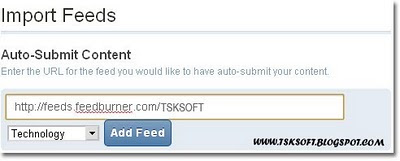
    Digg has recently introduced a new feature called “Import Feeds” in new Digg v4 Alpha . This “Import Feeds” option lets you to submit blog feeds to Digg so that you don’t have to manually submit your site’s post to Digg.Thus, whenever the blog is updated that post will be published in Digg automatically.Cool isn’t it ? :)


    Auto-Submit Your Content Feed To Digg

    1. Login to http://new.digg.com
    2. Goto Settings –> Import Feeds
    3. Now Enter the Feed URL you would like to have auto-submit your content.


    4. Select a category and click Add Feed.
    5. You will get a verification code.Insert it into next post.
    6. Publish the blog post.
    7. Click verify now in Digg.
    That’s it :) Drive huge amount of traffic from Digg. ;)
    I think these post helped you...!
    And please pass your valuable feedback through comments.
    Have a nice day...!
    [Read more]

    Free Professional Techcrunch Like WordPress Theme – CompPress

    Posted On // Leave a Comment
    If you are a TechCrunch fan, you would be interested in making your blog looks like TechCrunch. And if you are on wordpress blogging platform then I must say you are lucky enough to grab a TechCrunch like wordpress theme for free! :) It’s called as CompPress released by CompTalks.


    Top Features of Comppress Theme:
    • Neat and Clean Theme
    • Social Plugins – Tweetmeme, Facebook like and Google buzz.
    • Featured Image option
    • Change the logo from admin panel
    • Change the background of the logo from admin panel
    • Change the background image of the theme from admin panel
    • 728×90 Ad placement near the logo
    • Tabbed box in the sidebar for Popular , Recent and Random Posts (with thumbnail)
    • Inbuilt Feedburner Subscription box
    • 125×125 Ad boxes for private ad sales or affiliate banners
    • Two WordPress 3.0 dropdown menus
    • Author Box in the post page to display the author credentials
    • Threaded Comments
    • Widgeted sidebar
    • Widgeted Footer
    • It cost only $0.00. Yeah, it’s free! :)
    Screenshot:

    Demo | Download

    Please pass your valuable feedback through comments
    Have a nice day...!
    [Read more]