GameBoard Blogger Template

Posted On // Leave a Comment

Template name : GameBoard

Template type : 


  • 1 Sidebar, 2 Column, 
  •  Adapted from Wordpress, 
  • Featured Section, 
  • Fixed width, 
  • Header Banner, 
  • Magazine,
  • Right Sidebar, Slider, 
  • Top Navigation Bar, 
  • Web 2.0, White

Release date : December 1, 2010

Coder/Designer Name(s) : Lasantha Bandara / New WP Themes

Coder/Designer URL(s) : http://www.premiumbloggertemplates.com/
                                           http://newwpthemes.com/


I Think You All Will Like The Template...! Please Drop Your Valuable Feedback Through Comments
Have A Nice Day...! :)
And Keep Visiting :)
[Read more]

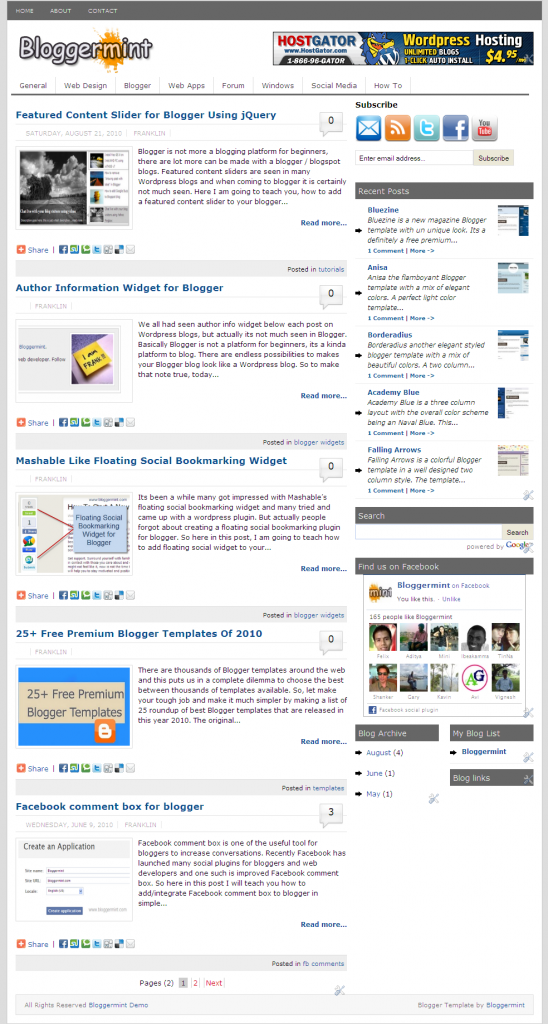
Free Download Bloggermint Blogger Template

Posted On // Leave a Comment
Hi Bloggers,Sorry for not updating the site these many days..I was a bit busy in my studies.So,I don't have enough time to update the website.Once again sorry for that,But i will update the site frequently when ever i had time :) So,Don't leave us Friends and my dear loyal readers.Today i like to share these beautiful Blogger Template which was designed by Bloggermint for bloggers.Thanks To Him for sharing these beautiful template with us.
The template has much features like as follows :
  • SEO optimized
  • Clean and neat interface
  • Premium features like bubble comments, page numbered navigation
  • Easy to customize
  • Author widget below every post
  • Sleek Facebook and Twitter share count button
  • Navigation bar with sub nav.

Live Demo | Download

It also has:
Author Info Widget:
To change the Author Info Widget...Just goto the edit html and tick the expand widgets option and now search for the code 
<div class=’author_info’>
and now change any text you like to edit like adding a bio of author...! which you like to see it on author info widget.And now to change the image,create a image with a size of 130x130 pixels and change these Url http://i50.tinypic.com/iw7lec.jpg with your image uploaded Url.


It also has Header Banner,Twitter Share Button,Subscribe Bar,Navigation bar

Please Drop Your Valuable Comments And Let Us Know What Do You Think On These Post...
If You Have Any Problem With Template,Let Us Know By Your Comments.Have A Nice Day :)
 
[Read more]

4 Best Web Apps to Manage Multiple Twitter Accounts

Posted On // Leave a Comment
We all know now a days using Multiple Twitter accounts is not so..... easier.We should always login to each twitter id to tweet or navigate through your accounts....But now the problem for these solution is sloved...!! Want to know about it.

Well,I found these web apps a better apps to use for your twitter accounts if you use Multiple accounts.Of course you can use them for a single account.So,they are as followed shown below

TwitIQ :

TwitIQ is a Smarter web app or client.It has Better Features like
- Real Time Updates
- Inline Image and Video Previews
- Multiple Accounts Support And Many More...! 
- Automatic Expansion of Shortened URLs


It is An advanced, Web-based Twitter client that supports grouping, Facebook, stats, multiple accounts,
pretty pictures, trending topics, and all sorts of other cool, awesome, and fantastic stuff :-)

It is an Web App for Easy management for multiple Twitter accounts and brand monitor...!

These is the Web App at present i am using for my twitter accounts..With these you can also attach Facebook account(Fan page) to post itself whenever you update your website or blog.


Please Drop Your Valuable Comments If You Think This Article Is Useful For You.
Share Your Feedback...!
Have A Nice Day And Blogging :)
[Read more]

Top 5 Gmail Labs Features You Must Enable Right Away

Posted On // Leave a Comment
We all know Gmail is one of the most famous email based service in the world.It is one of the simple and easy way to use and which has most powerful features within and also under the hood it has more features where you can enable more advanced functionality which we call it as "Labs".

Actually what is meant by Gmail Labs:
Gmail itself says that:


Gmail Labs allows you to try out experimental new features in Gmail. If you're going to brave the Labs world, it's important to keep the following things in mind about these features:

  • They may break at any time.
  • Similarly, they may disappear temporarily or permanently.
  • They may work so well that they graduate and become regular features.
So,Try at your own risk of course none of these features will not harm you in any kind or gobble your email but they are just not polished at Google would want them to be.


To enable the Labs in your Gmail,Just login to your Gmail account and click on the settings link and then select the Labs tab.Now select Add-ons you like from the list by 'Enable/Disable' radio button and save the changes you done by clicking the Save Changes button


I found Some of these Add-on Features to have a worth useful...check out right now:

Inbox Preview :


This Add-on shows you the latest mails you had in your inbox as a preview before you enter into inbox.It will be very important if your waiting for any important mail.Well if it loads slow for slow connections,I prefer you to use Basic Html.

Mouse Gestures : 

These Add-on helps to surf Next or Previous mails by holding right-click and move your mouse Left or Right to go for a previous or next messages.And if you move up you will be back into inbox.These is one of the best alternate way of browsing your mails,Of course you require a little practice.

Undo Send : 

These is the one of the Best Add-on because we can Undo the mail we sent.It is a most helpful Add-on for many of them since all of us make a minor mistakes while we send mails to others.It adds a Undo option feature to allow the mail revert which we sent.Of course i think these feature will be available for 5-10 Seconds after you sent the mail.But these Add-on is worth for most of them and also useful.

Custom Keyboard Shortcuts :


It lets you add custom keyboard shortcuts you define and it also add a new settings tab to re-define keys.

Inserting Images :

Allows you to add Images into your mail(message body).You can upload the images and insert from your computer or you can also insert by image Url
Note :These Add-on Feature will not work if you have offline enabled.


If i found any more new Add-ons useful...These Post Will Be updated with new Add-ons and Also Let Us Know If You find any add-ons useful.So,that we i update the post with more Add-ons here 
So,Don't Go Away...! Stay Updated With Us
And Also Please Drop Your Valuable Feedback Through Comments
Have A Nice Day :)
[Read more]

How To Show HTML/CSS Codes In Blog Posts

Posted On // Leave a Comment
Today i am going to teach you how to add Html codes in blog posts.By default web browsers read the code as a program rather than showing the code which you like to show up to your visitors or any other.So,its makes much difficult to make that way of showing the Html/Css Code and it is the most common problem for Blogger beginner's and Intermediate users.So,Now when we come back to the topic.I am going to teach you how to show up the Html/Css Code in a Box with good looking background.

Let Us Start The Topic:


  • First go to Blogger and then Sign-in
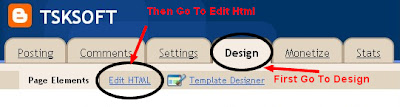
  • Go to your Dashboard--Layout(Design)--Edit Html


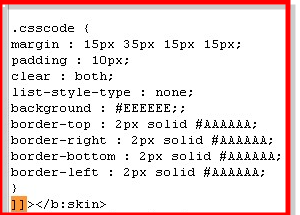
  • Now just copy the following code which is shown below and paste it before  ]]></b:skin>
--Note: Download your existing template Before you save changes in the template


.csscode {
margin : 15px 35px 15px 15px;
padding : 10px;
clear : both;
list-style-type : none;
background : #EEEEEE;;
border-top : 2px solid #AAAAAA;
border-right : 2px solid #AAAAAA;
border-bottom : 2px solid #AAAAAA;
border-left : 2px solid #AAAAAA;
}

For More Info you Can See How To Add The Code In The Below Image:

  • Now save you template to make the changes apply

From Now whenever you like to add a code in your post just add the code between 
<div class=”csscode”> and </div> like these as Shown below:


<div class="csscode">
HTML Code Here
</div>


That's it....!
Now you can show any of your code in a separate box easier to use
Please let us know if you any problem via comments
Have A Nice Day...!

    [Read more]

    Thesis Blogger Template

    Posted On // Leave a Comment
    Thesis Template is one of the best and popular WordPress theme which has many features.These template has been provided by DiyThemes for WordPress users.And i am very happy to announce that these Great Thesis Template has been now available for blogger also.By the help of Anup who Blog at "Hacktutors" the template has been successfully converted to use in blogger,Thanks to him for his great help and effort in making the temaplte available for blogger users also.Now these template is totally free(But Please Don't Remove Footer Credits).These Template Have 2 columns,Where you can have the chance to keep many widgets and ads you like and these template is mainly converted based on ShoutMeLoud.


    Features of Thesis Template:


    Well,these template has 2 stylish columns one is post body and the second one is the side bar where you can keep widgets and ads.Now at the bottom of this template you can have 3 rows also.


    This template also consists of Read More hack with automatic thumbnail to make the template more professional.So,It will not annoy your visitors with large posts and loading slow


    Readers can easily also comment on any of the post by clicking "Add your comment button" which consists on Home Page...! you can see in the above image and also, you can also see, how many comments are there in each of the blog posts.


    The template has 2 navigation bar at the top of template where you can add the main link to your blogs post or any categories.


    On the bottom of these template you have 3 rows where you can add optional widgets like About Me, Categories and so on what ever you like...!


    It has a Numbered Page Navigation at the bottom of each page...Which is so popular which makes easier to navigate. 


    Once Again Let Us All Say Thanks To Anup The Blogger At "Hacktutors" For Making The Template.
    And My Dear Loyal Readers And Friends Please Pass Your Valuable Feedback Via Comments...!
    Lets Us Know What Do You Think...!
    Have A Nice Day And Blogging.


    Note:The template has been updated please download from the below link


    [Read more]